

Snapchat, the trailblazer in the world of visual storytelling, constantly surprises its users with innovative features. From capturing captivating moments to adding a unique touch to your snaps, let’s know about how to get a .5 on snap.
Contents
Get a 0.5x Camera on Snapchat on an iPhone
To get a .5 on Snapchat on an iPhone, you can follow these steps:
- Open Snapchat on your iPhone.
- Access the camera screen by swiping right from the main screen.
- Look for the camera switch icon, usually located at the screen’s top right or left corner. Tap on it to switch to the ultrawide camera if available.
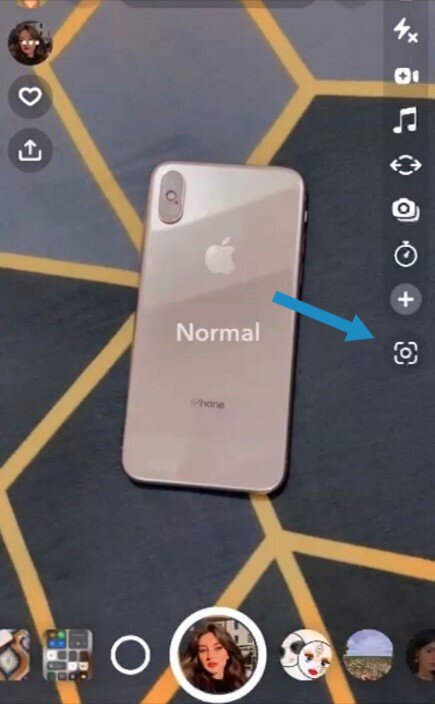
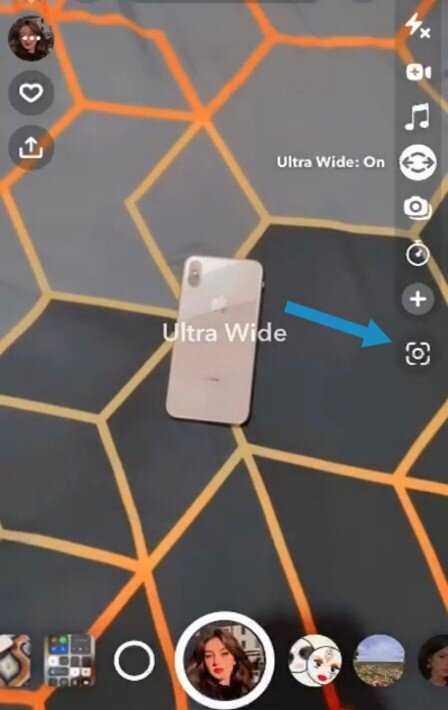
4. If the ultrawide camera is not available or you are unable to find it, make sure you have the latest version of Snapchat installed on your iPhone. You can update the app from the App Store if needed.
5. If you are still experiencing issues or have specific questions about Snapchat on your iPhone, you may want to reach out to Snapchat support or consult the Apple Community for further assistance.
NB: Please note that if your iPhone model is older than the iPhone 11, you will not have access to this feature.
How To Get a .5 On Snap on an Android Phone?
To get a .5 on Snapchat on an Android phone, you can follow these steps:
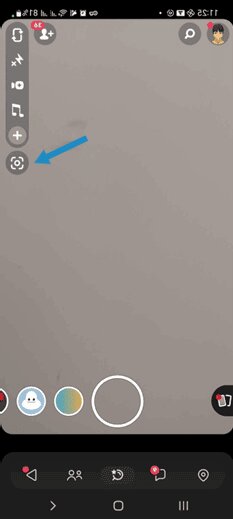
Update the Snapchat app:
Ensure you have the latest version of the Snapchat app installed on your Android phone. You can update the app through the Google Play Store. Here’s how:
- Open the Google Play Store app on your phone.
- Search for “Snapchat” in the search bar.
- If an update is available, you will see an “Update” button next to the Snapchat app. Tap on it to update the app.
Check for device compatibility:
The .5 feature on Snapchat may not be available on all Android devices. Snapchat often rolls out new features gradually, so it’s possible that your device may not have access to the .5 feature yet.
Keep an eye out for app updates and announcements from Snapchat regarding new features and compatibility with different devices.
Restart your phone:
Sometimes, restarting your Android phone can help resolve issues with apps like Snapchat. Try restarting your phone and then open Snapchat to see if the .5 feature becomes available.
You may also like: How to Edit Shortcuts on Snapchat: A Comprehensive Guide
What If Your Android Phone Is Not Compatible with Snapchat 0.5x Feature?
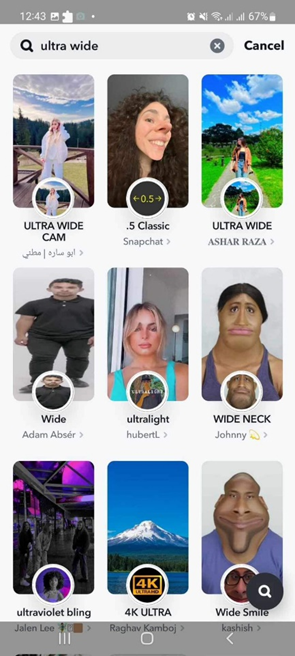
If your Android phone is not compatible with the new feature of Snapchat .5 option then follow these steps:
- Make sure you have the Snapchat app installed on your Android phone. Open it and log in to your account.
- To find the Filter .5, go to the Explore section in Snapchat. You can find the Explore icon at the bottom right corner of the screen.
- In the Explore section, you’ll see a search bar at the top of the screen. Type in .5 or ultra-wide and hit enter.
- A variety of filter options will appear. Scroll through the options and find the Filter .5 that catches your eye.
- To capture the moment with the Filter .5, simply tap on the filter of your choice. The filter will be applied to your camera view, allowing you to snap creative and unique photos or videos.



Leave a Reply
You must be logged in to post a comment.